
Skip to content
Pulsed Technologies Logo
  • About Us
  • Downloads
  • Products
    • All Products
    • tDCS Exploration KitNEW!
    • VitaSet Generator (VSG)
    • P3pro v4
    • PFG2U
    • P3 v3
    • iCS
    • Shop
  • Support
    • Start Here
    • Video Tutorials
    • Run on Mac
    • Remote Support
    • Register tDCS
  • Links
  • Contact
  • Shop
    • Browse Products
    • Buy through Associates
    • Cart
    • Checkout
    • My Account
    • Sales, Refund & Warranty Policies & Terms
    • Legal Notice
  • About Us
  • Downloads
  • Products
    • All Products
    • tDCS Exploration KitNEW!
    • VitaSet Generator (VSG)
    • P3pro v4
    • PFG2U
    • P3 v3
    • iCS
    • Shop
  • Support
    • Start Here
    • Video Tutorials
    • Run on Mac
    • Remote Support
    • Register tDCS
  • Links
  • Contact
  • Shop
    • Browse Products
    • Buy through Associates
    • Cart
    • Checkout
    • My Account
    • Sales, Refund & Warranty Policies & Terms
    • Legal Notice

Downloads

  1. Home
  2. Downloads
DownloadsPaul Dorneanu2026-08-25T02:51:13-05:00
For tutorials, PDF manuals, information on technology please go to our Support Page

Software Download

PFG Lab v1.4.99.473 Release Candidate 2

Size: 10.50 MB
Release Date: 2026-07-28

For all Windows versions, including Windows 11 & Windows 10.
PFGLab 1.4.99.473 RC2 is the Release Candidate 2 build for the upcoming major PFGLab 1.5 release.

Download the installer

NEW! 2025 UPDATE: Driver Download for all Windows versions, including Windows 11

Version: 2.12.36.20

Release date: March 4th, 2025

Note: This driver version is NOT included in the latest software release, so please update it to the latest.

Download Driver

PFG2S Firmware Update

Download and run this if you are having issue connecting to the PFG2S.

Download PFG2S Firmware Updater

Remote Support (Quick Support)

Need help with your Pulsed Technologies software or device?

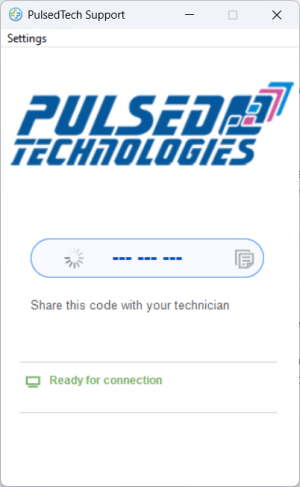
Download and run our Remote Support application to allow a PulsedTech Support Team member to securely connect to your computer and assist you.

How it works:

  1. Click Download below.
  2. Run the downloaded application.
  3. Wait until the status shows Ready for connection.
  4. Tell the 9-digit support code shown on screen to the PulsedTech Support Team member assisting you.
  5. When prompted, approve the connection request.

You remain in control of the session and can end the remote connection at any time.

Download PulsedTech Remote Support

If Windows or your security software asks for permission, choose Yes or Allow so the support application can run correctly.

PulsedTech Remote Support is powered by Splashtop SOS.

Find out more about the technology

Pulsed Tech worldwide team has launched a new educational and informational website. Explore the website to find more about this amazing technology and it's power.

"The Electric Human" electronic book by Holman and Haltiwanger Electric Human Cover

Pulsed Technologies Network

www.PulsedTech.ro
www.PulsedTechResearch.com
www.IntroductionToRife.com
Higher Frequencies Harmonic Calculator

Important Information

Sales, Refund & Warranty Policies

Disclaimer & Legal Notice
Privacy & Cookies: This site uses cookies. By continuing to use this website, you agree to their use.

To find out more, including how to control cookies, see here: Cookie Policy

Contact Info

Bioenergetics & Pulsed Technologies SRL, Romania, EU

Phone: 214-453-0095

Mobile: +40-722-643640

Email: Sales & Support

Business Hours (Central Time US)

DayFromTo
Monday09:00 AM05:00 PM
Tuesday09:00 AM05:00 PM
Wednesday09:00 AM05:00 PM
Thursday09:00 AM05:00 PM
Friday09:00 AM04:30 PM
SaturdayCloseClose
SundayCloseClose
Copyright 2016 SC Bioenergetics & Pulsed Technologies SRL (Romania, European Union)| All Rights Reserved
Toggle Sliding Bar Area
Page load link
Loading Comments...